
Ector's Directory Listing Routes Warrant Questions
Ector does not publish a dedicated official municipal-court website in the sources reviewed. The Texas Municipal League local-government directory lists Ector and supplies a verified contact route. Its listing is useful for locating the city, but it is not a docket, warrant roster, or court-status search.
Use the Ector local-government directory entry to verify the city contact, then ask the municipal court to check the individual case.
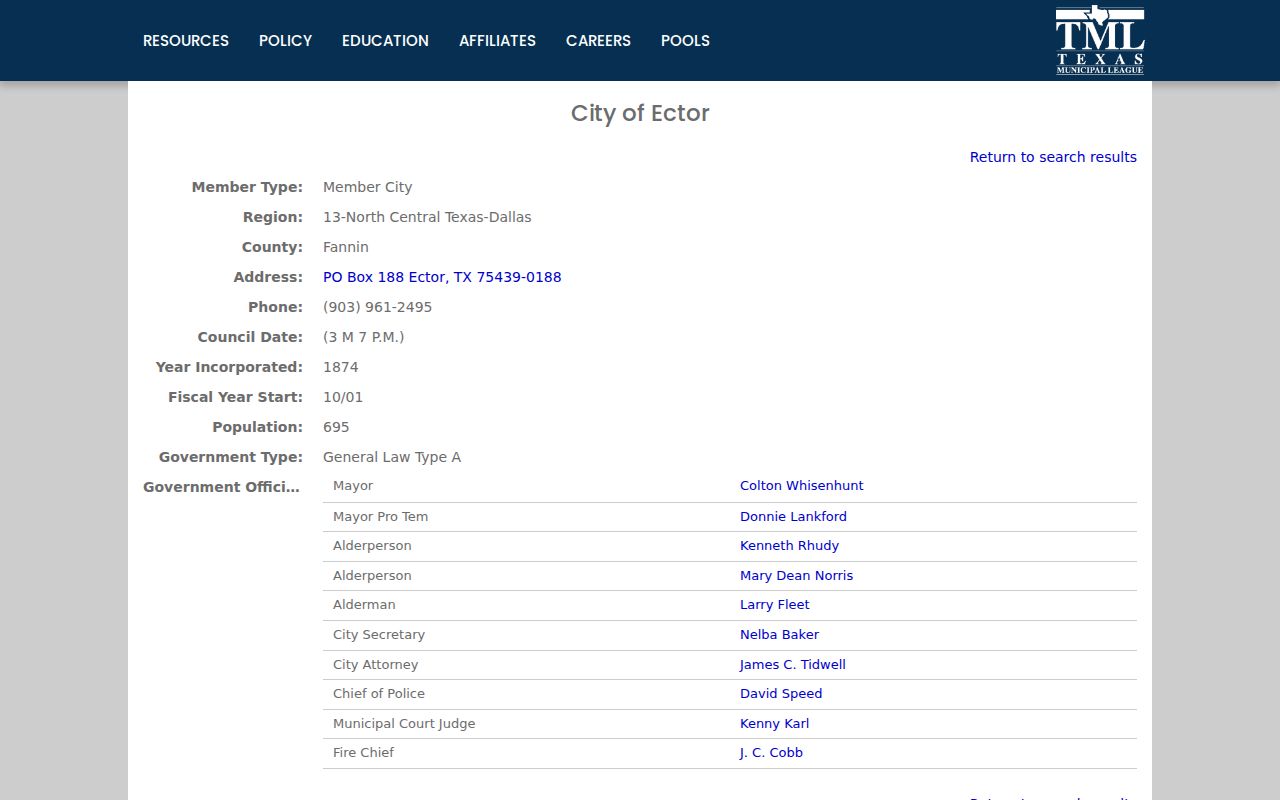
A directory entry confirms a route to the city; it does not confirm whether a warrant exists.
How to Check for a Warrant in Ector
Because Ector has no verified public warrant search page, call the municipal court or city contact and ask for a case-specific status check. Provide a citation or cause number when available, along with the full name and any identifier the clerk requests. Ask which court issued the warrant and whether it requires an appearance, payment, or judicial action.
- Call the Ector city or municipal-court contact at 903-961-2495.
- Give the citation or cause number and ask the clerk to identify the case.
- Confirm the warrant status, amount, and next court requirement.
- Use Ector Police for service or enforcement questions.
- For a county or felony matter, call the separate court that filed it.
Ector Has No Verified Online Warrant Roster
Research found no city-hosted form that searches Ector warrants by name or citation and no publicly described update schedule. That gap should be read as a limit of online access, not evidence that the city keeps no records. The clerk's case system and any paper notices remain the more direct sources for a specific matter.
Ask the city which office accepts a record request and whether the court has a public docket or in-person inspection procedure. A directory page or general city contact cannot return the same confirmation as the clerk who can see the case.
The Ector Police Department and Municipal Court
Ector Municipal Court handles fine-only city cases and keeps the municipal case record. Ector Police addresses local law-enforcement and service questions. The court, rather than a general directory or police contact, confirms whether a court-issued warrant remains active and what the judge requires.
The available directory lists the city contact at 903-961-2495 and a mailing address of P.O. Box 188. Call first to confirm which staff member handles municipal court matters and whether an in-person visit is needed.
Ector's Blank Court-Activity Fields Are Not Zero Counts
Some Texas Office of Court Administration city-level activity fields for Ector are blank. A blank report cell means no value was provided in that field; it should not be converted into a claim that the court had zero cases or zero warrants.
Activity reports summarize filings and dispositions across a reporting period. They do not enumerate currently open cases. For an individual Ector citation, the court's own case record remains necessary regardless of what an annual table does or does not show.
Types of Ector Warrants
An Ector municipal warrant question usually concerns a fine-only city citation or a missed municipal-court obligation. A county criminal charge, district-court felony matter, or warrant issued by another court follows that issuing court's record and procedures. Confirm jurisdiction before deciding which office to contact.
| Warrant Type | How It Arises | Who Issues It |
|---|---|---|
| Traffic citation | Unresolved fine-only city traffic matter | Ector Municipal Court |
| City ordinance matter | Alleged violation of a municipal rule | Ector Municipal Court |
| Failure-to-appear process | Required city-court response was missed | Ector Municipal Court |
| County arrest warrant | Process in a separate county or district case | Issuing court outside the city docket |
Ector's Mailing Address Routes Warrant Inquiries, Not a Docket
The city directory lists P.O. Box 188 for Ector. That mailing address can help route correspondence, but it does not establish that a letter has reached the court clerk or that a warrant has been resolved. Put the citation or cause number on a written inquiry and keep a copy.
For a time-sensitive question, use the listed 903-961-2495 number first. Confirm the correct recipient, any required form, and whether the city accepts electronic or in-person requests before sending private identifying information by mail.
What an Ector Warrant Record Shows
No public Ector warrant-result page was verified, so the clerk should identify the official case fields during a direct inquiry. Give the citation number rather than relying on a name-only search, and ask the office to distinguish an unpaid balance from an active warrant or a court order still awaiting action.
| Case identifier | No Ector number pattern was located; ask the clerk which identifier appears on its file. |
|---|---|
| Person match | Confirm the full name and another identifying detail. |
| Offense | Verify the cited traffic or municipal allegation. |
| Issuing court | Confirm Ector Municipal Court for a city case. |
| Amount due | Request the current itemized amount directly from the clerk. |
| Status | Ask whether active, recalled, served, or pending court action. |
Ector Case Follow-Up Should Stay in the Court Record
With no online case-status feed, a person who calls or mails the city should record the date, name of the contact, and response given. If the court accepts a payment or filing, keep its receipt and ask when the action will appear in the official case record.
A bank or payment-provider confirmation shows that a transaction was submitted; it does not by itself prove that the court recalled a warrant. Request a separate status check after the clerk has processed the case.
Where Ector Warrants Fit With Fannin County
Ector Municipal Court maintains its city cases. County and felony matters sit on separate Fannin County dockets, while the Sheriff's Office handles its own process records. Texas offers no public screen that covers every city and county warrant at once.
Warrant flow: Ector Municipal Court / Police › Fannin County Sheriff for service › separate issuing court record
For the county route, see Fannin County warrant records and the county warrant search page.
Ector's Public-Record Request Needs a Specific Case
A resident seeking a public Ector court record can contact the city and request the document or case information by identifier. A general request for a list of all warrants may be handled differently and could be limited by law. State clearly whether the request concerns a citation, docket entry, payment history, or warrant return.
The lack of a city search portal does not remove public-record procedures, but disclosure can be subject to exceptions and court-access restrictions. Ask the clerk which records are available for inspection and what response time or format applies.
Public Access to Ector Warrant Records
Contact the Ector city office to ask how to inspect a public municipal case and whether the requested record can be provided. No online result does not determine whether the city has a file. Confidential juvenile information and material protected by law may not be released as part of a public request.
Key Rules:
Texas Public Information Act, Government Code Chapter 552 - describes public access and exceptions for government records.
Texas Code of Criminal Procedure, Article 15.26 - states how an officer carries out an arrest warrant and returns it.
Texas Family Code Chapter 58 - makes designated juvenile records confidential.